Knock In assistant provides flexible and powerful features for easing your communication with groups of contacts. From the Knock In assistant landing page, go to the “groups” tab to access these functions.
Creating a group can be done very simply:
- Effectuez un tap court sur l’icône « ajout d’un groupe »
- Donnez un nom pour ce groupe
- Sélectionnez les membres de ce groupe parmi les contacts de votre carnet d’adresses.
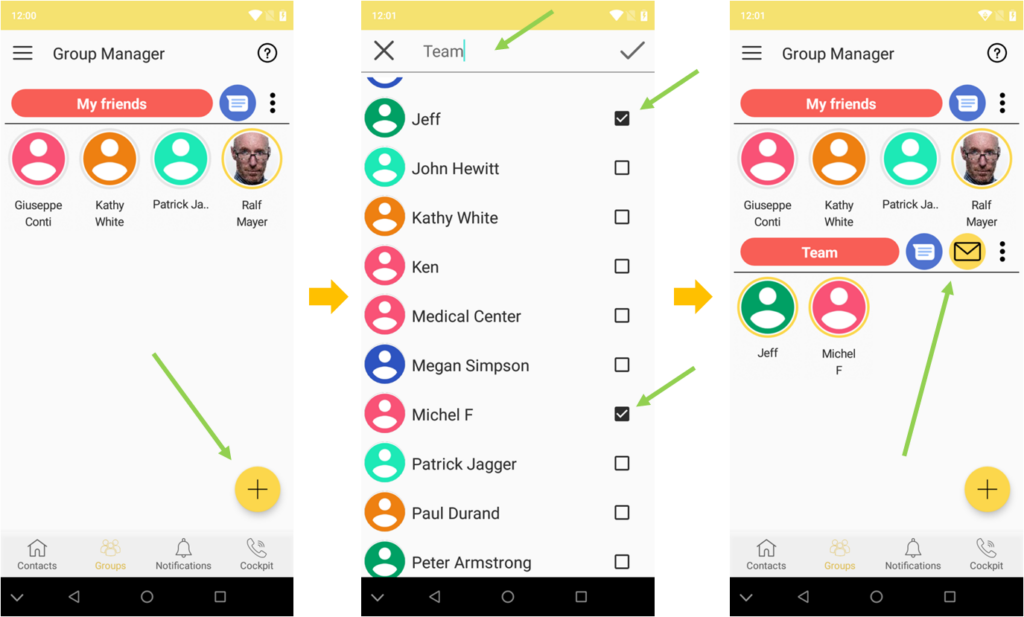
Une fois créé, le groupe est visible et l’application affiche le nom du groupe, les membres du groupe et les médias avec lesquels vous pouvez joindre simultanément tous les membres du groupe.
Note: in the scope of this first version of the Knock In assistant, the medias for group communication can be only SMS/Messaging and/or e-mail.
L’envoi d’un message est vraiment très simple: un tap court sur le symbole du média que vous souhaitez utiliser (symboles situés à droite du nom du groupe) vous dirigera vers l’écran de composition du message.
In some situations, you may only want to have a “one shot” communication with a group of contacts. Thanks to the “multi select” feature, the Knock In assistant allows you to do so in a very easy and straightforward way, skipping the group creation operation.
- Depuis l’écran d’accueil sélectionnez les contacts avec lesquels vous voulez communiquer par une touche longue (pour le premier) et des touches courtes (pour les suivants)
- The Knock In assistant indicates the common communication channel that can be used to reach all the contacts. You can select the channel that suits your needs.
- In case a single communication channel cannot reach all the selected contacts, the Knock In assistant allows you to send the same message simultaneously through different communication channels (sms, e-mail). To do so, just short tap the “multi channels” icon.
Your communication assistant with then display the medias available for each of the selected contacts: just pick up the appropriate media for each of the contacts, then type in your message !